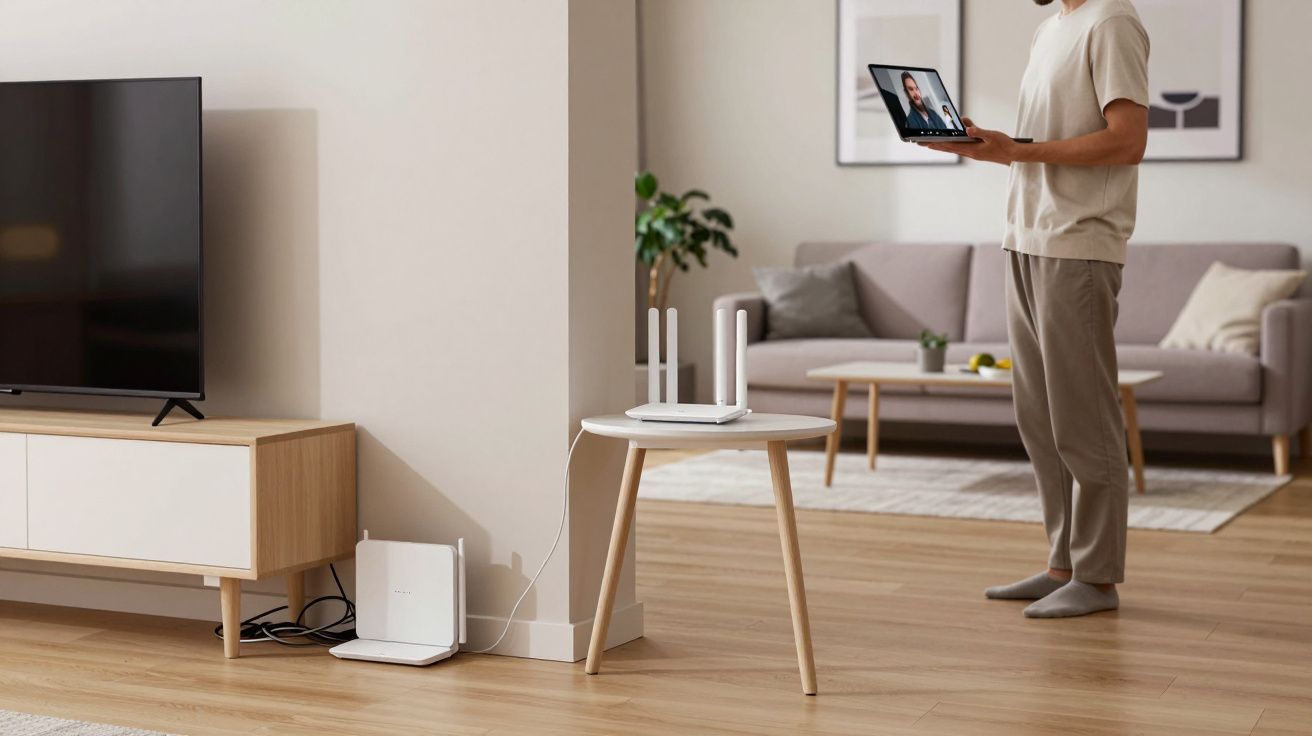
Why leaving your router on the floor ruins your Wi‑Fi and what engineers advise instead
At first glance, the router on the skirting board looks fine.
All the lights are blinking, the cables are tucked away, the box is out of sight. You’d walk past it ten times a day without really registering it. Yet for the people who design networks for a living, that quiet plastic brick on the carpet is a red flag.
There’s the soundless drag of it: pages loading a beat too slowly, video calls softening, your phone dropping to 4G in the back bedroom. You tap the router in irritation, maybe reboot it, and carry on. The real issue is rarely the box itself.
It’s where you’ve left it.
One small change in height or position can feel like someone quietly upgraded your broadband. Same package, same hardware, different physics.
Why the floor is Wi‑Fi’s worst seat in the house
Walk into the home of someone who cares a lot about signal and you’ll notice it straight away: the router is off the floor. Often halfway up a wall, on a shelf, or at least on a small table. It looks almost ordinary, but it’s never hiding behind a sofa leg.
They don’t do this for looks. They do it to keep radio waves away from the worst of the clutter.
Wi‑Fi signals spread out a bit like the glow from a lamp. Put the lamp on the floor behind a chair and half the room falls into shadow. Put the router on the floor behind a TV cabinet and you build the wireless version of that shadow.
Engineers have a blunt line for it: “If your socks can reach your router, your Wi‑Fi is working too hard.” At ground level, your signal has to fight furniture, radiators, wiring and even the metal in floor structures before it gets to your phone.
It’s not mystical. It’s simple radio behaviour.
Signals move more cleanly through open air than through solid objects. Carpet, plasterboard, brick, water pipes and even people all soak up and scatter that energy. When the router sits on the floor, it spends more of its strength getting out of the basement of your room.
What the floor actually does to your signal
Network engineers talk about three villains when they look at badly placed routers: absorption, reflection and interference. The floor helps all three.
The materials around your ankles are not neutral. Thick carpets, concrete slabs and underfloor heating pipes all grab slices of the signal and turn them into heat. You never feel it, but your coverage does.
Then comes reflection. Metal table legs, radiators, filing cabinets and TV stands bounce parts of the signal in odd directions. Instead of a smooth, even bubble around the router, you end up with hot spots and dead patches.
Finally, interference sneaks in. Down low is where power extension leads, chargers, baby monitors and smart speaker plugs tend to pile up. All those electronics create a noisier environment for the router to shout over.
One engineer described it as “trying to run a meeting from under the table while the hoover’s on”. The router keeps talking. Your devices keep asking it to repeat itself.
The engineer rule of thumb: waist‑high and central
When you ask people who design wireless networks where to place a router at home, their advice sounds almost embarrassingly simple: put it at about waist or chest height, somewhere near the centre of the space you actually use.
Not in the loft, not buried in the hallway cupboard, not wedged under the TV purely because the phone socket is nearby.
Think of an invisible bubble around the router. The more of your flat or house that sits inside that bubble without walls or heavy furniture cutting through it, the happier your devices will be.
That usually means:
- Mounting the router on a wall bracket, or
- Standing it on a small table, bookcase or shelf
- Keeping it at least a few hand‑spans away from big metal objects
You do not need laser‑level precision. You just need to give the box a clear view of the rooms where people actually work, stream and scroll.
Simple placement upgrades that make a big difference
Start with what you have. Engineers rarely rush to “more kit” before they’ve tried “better position”.
Move the router one or two metres up from the floor if your cables allow. Even a cheap wall‑mounted shelf or a sturdy stack of books on a sideboard can give the signal the breathing room it was missing.
Next, look sideways. Try to bring the router roughly towards the centre of your living areas rather than leaving it marooned at one end of the building. If your incoming line pins you to a corner, a short extension cable from the master socket to a better spot is often allowed and inexpensive.
Then reduce clutter around it:
- Avoid pushing it right up against a TV, fridge, microwave or fish tank
- Keep it clear of tangled extension leads where possible
- Give it a little open air around the antennas or vents
Make one change at a time and live with it for a day or two. The difference often shows up in the quiet bits: fewer “unstable connection” warnings, smoother calls, fewer complaints from the far bedroom.
Common placement mistakes that quietly sabotage Wi‑Fi
Most homes share the same handful of habits that drive engineers slightly mad. None of them is malicious. All of them chip away at the performance you’ve paid for.
Here are the usual suspects:
- Behind the television: The TV acts like a big shield. The cabinet traps heat. HDMI cables and consoles add noise.
- Inside a cupboard or media unit: Wood and doors dampen signal, especially if they hide other electronics and wiring.
- On a window sill facing the street: Great for the pavement, not great for the rooms behind it. Half the signal escapes outside.
- In the loft near the roof tiles: Brilliant for the pigeons, terrible for the ground floor, especially through thick ceilings.
- Next to cordless phone bases and baby monitors: These often sit in the same frequency bands and can muddy the water.
Fixing any one of these usually feels like untangling a knot you’d learned to live with. Same router, same deal, just finally allowed to do its job.
Quick comparison: floor vs good placement
| Placement | What tends to happen | Result for you |
|---|---|---|
| On the floor, under furniture | Heavy absorption and cluttered interference | Patchy rooms, slower speeds, dropouts |
| Waist‑high, reasonably central | Clearer air path, more even coverage | Stronger, steadier Wi‑Fi across rooms |
When moving the router isn’t enough
Sometimes you can do everything “right” with placement and still hit the limits of physics. Old thick brick walls, long narrow terraces and multi‑storey homes all ask a lot of a single box.
Engineers handle that with extra access points, not heroic router settings.
In a typical house, that looks like:
- A main router in the best central spot you can manage
- One or more Wi‑Fi extenders or mesh nodes on other floors or distant rooms
- Optional network cables between boxes if you can run them
Before you buy anything, though, squeeze the free gains:
- Raise the router off the floor.
- Move it away from big metal and dense furniture.
- Rotate it slightly and test different angles in the furthest room.
Many “I need a mesh system” complaints soften once the main unit is set up sensibly. If dead zones persist after that, then extra kit starts to earn its keep.
The deeper comfort of a network that just works
There’s a subtle mental load that comes from living with flaky Wi‑Fi. The tiny pause before you join a work call. The sigh when streaming buffers during the best scene. The ritual reboot before guests arrive “just in case”.
Fixing placement doesn’t only speed things up. It calms the background noise of your day.
There’s something oddly satisfying about solving it with tape measure logic rather than another subscription. You don’t need to understand every radio diagram. You just give the signal a better shot at reaching the people who rely on it.
Behind that small change is a quiet shift: from “put it where it’s least in the way” to “put it where it can actually help us”. The router stops being an eyesore on the floor and turns into a tool that supports how your home really lives.
In many houses, the difference between “terrible Wi‑Fi” and “perfectly fine” is about the height of a coffee table and the courage to pull the router out of hiding.
That’s the unglamorous, engineer‑approved trick: lift the box, clear its view, and let the physics work for you instead of against you.
FAQ:
- Does putting the router higher always improve Wi‑Fi? In most homes, raising the router from floor level to around waist or chest height improves coverage, especially to devices further away. It will not fix every building quirk, but it removes a major handicap.
- Is it bad to keep the router in a cupboard if the door is open? An open door is better than a closed one, but shelves, walls and nearby electronics still absorb and reflect signal. A cupboard should be a last resort, not the default.
- Do all devices benefit the same way from better placement? Laptops and phones usually see the strongest gains because they move around and rely heavily on wireless. Static devices wired by Ethernet, like a desktop PC, are less affected.
- Will changing the channel or frequency help more than moving the router? Tweaking channels can reduce interference from neighbours, but if the router is buried on the floor, you’re still fighting basic physics. Engineers normally sort placement first, tuning second.
- Is it safe to wall‑mount a router? Yes, as long as you follow the manufacturer’s ventilation guidance, avoid covering vents, and keep cables secure. Many models have mounting holes on the back specifically for this purpose.





Comments (0)
No comments yet. Be the first to comment!
Leave a Comment